

Creating this post so I can remember how to do this.
Picked this up from youtube from the blazor power hour:
This basically creates a check box which has a nice border and a tick mark in the top left which I have made look like:
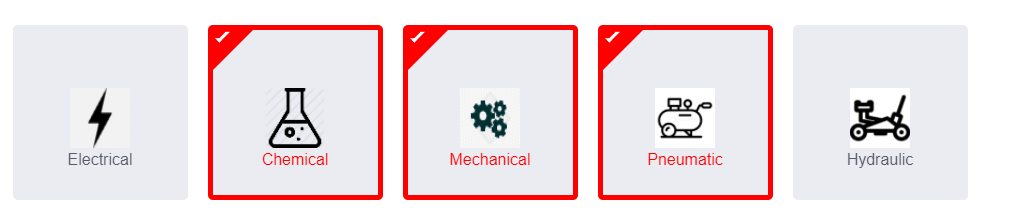
This is done in a blazor project I am working on.
CSS:
body {
    background: #585c68;
}

.wrapper {
    width: 780px;
    margin: 100px auto 0;
}

    .wrapper .title {
        font-size: 24px;
        color: #fff;
        font-weight: 700;
        text-align: center;
        margin-bottom: 50px;
    }

.container {
    display: flex;
    flex-wrap: wrap;
}

    .container .option_item {
        display: block;
        position: relative;
        width: 175px;
        height: 175px;
        margin: 10px;
    }

        .container .option_item .checkbox {
            position: absolute;
            top: 0;
            left: 0;
            z-index: 1;
            opacity: 0;
        }

.option_item .option_inner {
    width: 100%;
    height: 100%;
    background: #ebebf2;
    border-radius: 5px;
    text-align: center;
    padding: 58px 40px;
    cursor: pointer;
    color: #585c68;
    display: block;
    border: 5px solid transparent;
    position: relative;
}

    .option_item .option_inner .icon {
        margin-bottom: 10px;
    }

        .option_item .option_inner .icon .fab {
            font-size: 32px;
        }

    .option_item .option_inner .name {
        user-select: none;
    }

.option_item .checkbox:checked ~ .option_inner.theme {
    border-color: #ff0000;
    color: #ff0000;
}

.option_item .option_inner .tickmark {
    position: absolute;
    top: 0;
    left: 0;
    border: 20px solid;
    border-color: #000 transparent transparent #000;
    display: none;
}

    .option_item .option_inner .tickmark:before {
        content: "";
        position: absolute;
        top: -18px;
        left: -18px;
        width: 15px;
        height: 5px;
        border: 3px solid;
        border-color: transparent transparent #fff #fff;
        transform: rotate(-45deg);
    }

.option_item .checkbox:checked ~ .option_inner .tickmark {
    display: block;
}

.option_item .option_inner.theme .tickmark {
    border-color: #ff0000 transparent transparent #ff0000;
}
Blazor Component Template:
@typeparam TItem

<div class="container">
    @foreach (var item in Items)
    {
        var Id = Guid.NewGuid();

        <label for="@Id" class="option_item" >
            <!-- Check to see if the checkbox needs to be checked or not from the user data byt checking if any of the items are already in the SelectedList -->
            @if (SelectedItems.Contains(item))
            {
                <input id="@Id" type="checkbox" class="checkbox" checked @onchange="_ => HandleChange(item)" />
                var i = 5;
            }
            else
            {
                <input id="@Id" type="checkbox" class="checkbox" @onchange="_ => HandleChange(item)" />
                var ii = 6;
            }
            <div class="option_inner theme">
                <div class="tickmark"></div>
                <div class="name">
                    @ItemTemplate(item)
                </div>
            </div>
        </label>
    }
</div>


@code {
    [Parameter]
    public IEnumerable<TItem> Items { get; set; }

    [Parameter]
    public RenderFragment<TItem> ItemTemplate { get; set; }

    [Parameter]
    public List<TItem> SelectedItems { get; set; } = new();

    [Parameter]
    public EventCallback<List<TItem>> SelectedItemsChanged { get; set; }

    void HandleChange(TItem item)
    {
        if (SelectedItems.Contains(item))
        {
            SelectedItems.Remove(item);
        }
        else
        {
            SelectedItems.Add(item);
        }

        SelectedItemsChanged.InvokeAsync(SelectedItems);
    }
}
The checking if an item already exists in the selected items list is done so that if it is then the box will be checked etc.
The implementation into a blazor page for my use is:
<SquareCheckBox Items="maintReqInitation.Isolations" Context="Isolation" @bind-SelectedItems="maintReqInitation.IsolationsSelected">
                                    <ItemTemplate>
                                        <div class="row">
                                            <div class="col-lg-12">
                                                <img src="@Isolation.ImageLocation" alt="@Isolation.Name" width="60" height="60" />
                                            </div>
                                        </div>
                                        <div class="row">
                                            <div class="col-lg-12">
                                                @Isolation.Name
                                            </div>
                                        </div>
                                    </ItemTemplate>
                                </SquareCheckBox>
The ItemTemplate allows the content of the check box to be set how it is needed with a image, icon, text etc.
About the author
I am leanring to code as much as possible to aim to move into making a career out of programming/software development.
I am 42 years old so hopefully not to old to move careers but I love to learn so hopefully it will still gain me knowledge and new skills regardless.
Currently I work as engineer designer using SolidWorks to create press tooling and anodising plant drawings. Part of this role it also doing the internal IT support.
Comments
Join the discussionNo comments yet. Be the first to comment.


